
5 Business Processes You Can Automate with AI Agents Today
The five highest-ROI business processes to automate with AI agents in 2026 — customer support, lead qualification, invoice processing, inventory monitoring, and internal helpdesk. Real numbers, real implementation paths.

Which Business Processes Should You Automate with AI Agents First?
The five highest-ROI processes to automate with AI agents in 2026 are customer support triage, sales lead qualification, invoice and accounts payable processing, inventory monitoring and reordering, and internal knowledge / helpdesk requests. Each one is repetitive, rules-rich, and runs on data your business already has — which is exactly the shape of work where agents outperform both humans and rule-based RPA. Done well, these five together free up 30–60 hours per month for a typical SMB and pay back their build cost inside two quarters.
The hard part is no longer the technology. AI agents that plan multi-step actions, call APIs, and hand off to humans cleanly are well within reach for any business with clean data and a clear workflow. The hard part is choosing the right starting point — because picking a low-volume, edge-case-heavy process to automate first is the fastest way to lose the room.
This post walks through the five processes we recommend SMBs and growing businesses tackle first, with real numbers, the tools that actually work, and what to watch out for before you build.
What Is an AI Agent (and Why It Beats Traditional Automation)
An AI agent is an autonomous software system that takes a goal, plans the steps to achieve it, calls the tools it needs (APIs, databases, email, third-party services), and adjusts when something doesn't go to plan. Unlike a chatbot — which responds to single inputs — an agent works through multi-step tasks the way a junior employee would. We covered the deeper distinction in AI Chatbot vs AI Agent.
The reason agents have started to displace traditional rule-based automation in 2026 is tolerance for messy reality. RPA breaks the moment a vendor changes an invoice template; an agent reads the new template the same way a person would. RPA needs an explicit rule for every edge case; an agent reasons through the edge case using context. That difference is what unlocks the use cases below — every single one of them involves messy inputs, exceptions, and decisions that used to require a human in the loop.
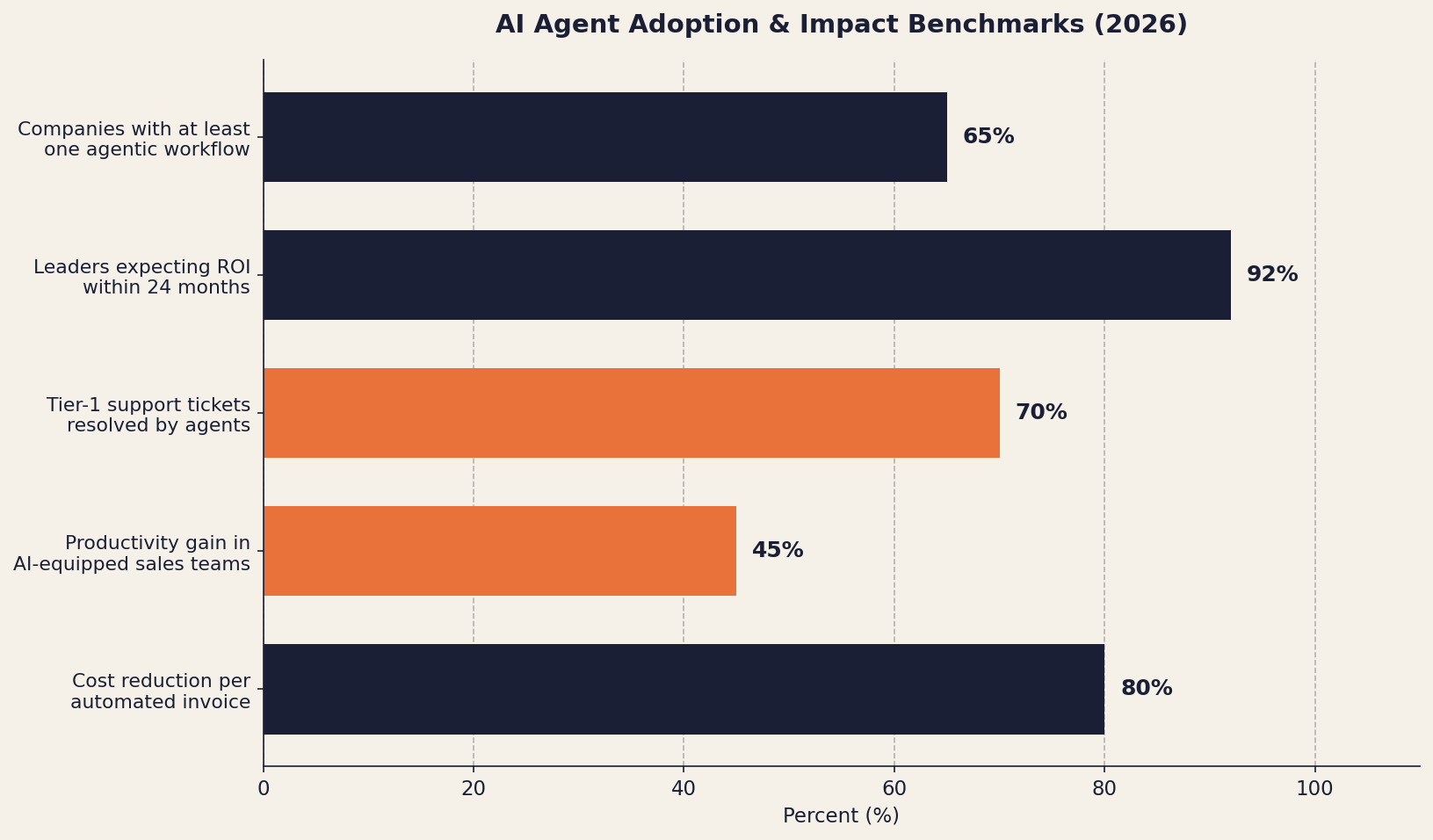
Industry-wide, 65% of companies have already automated at least one workflow with agentic AI, and a 2025 Deloitte survey found 92% of leaders expect measurable ROI within two years. The gap between leaders and laggards is widening fastest in operations-heavy SMBs — exactly the businesses these five use cases target.
1. Customer Support Triage and First Response
Best for: Any business handling 50+ inbound support requests per week across email, chat, or social inboxes.
This is the single most popular AI-agent use case for one reason: the data is already there. Every support ticket, every Messenger message, every email to support@ is a labeled training example. An agent reads the incoming request, classifies intent, retrieves the relevant knowledge-base article, drafts a response, and either sends it (for high-confidence cases) or queues it for a human reviewer (for lower-confidence ones). The same agent can pull order status from your e-commerce platform, check shipment data, or open a ticket in your CRM — without anyone copy-pasting between systems.
What the numbers actually look like
- 60–80% of Tier 1 tickets resolved without human involvement is the typical range for a well-tuned support agent. We've seen this pattern hold across e-commerce, SaaS, and B2B services.
- Average first-response time drops from hours to minutes. One enterprise case study reported a drop from 4 hours to 12 minutes after deploying an agent on first-line support.
- Human agents handle the same ticket volume in 40–50% less time because they're only seeing the tickets that genuinely need them.
How to ship it in 2–4 weeks
- Pick one channel first. Email or web chat — not both. Multi-channel from day one is the most common reason these projects stall.
- Train the agent on your last 90 days of resolved tickets. Real history beats any synthetic dataset.
- Set a confidence threshold. Above 85% confidence, the agent sends. Below, it drafts and a human reviews. Tune the threshold weekly.
- Connect to your knowledge base. Notion, Confluence, Help Scout, Zendesk — whatever you already use. Don't migrate just for the agent.
- Track deflection rate, customer satisfaction, and false positives weekly. False positives — wrong answers sent confidently — are the failure mode that breaks trust fastest.
The mistake to avoid: launching with no human-review fallback. Even at 95% accuracy, 5% of customer interactions handled wrong by an autonomous bot will tank your CSAT faster than the volume gain pays back.
2. Sales Lead Qualification and Follow-Up
Best for: Businesses with 30+ inbound leads per week or any outbound prospecting motion.
Sales is the second-most-mature use case after support, and arguably the highest-leverage for businesses where rep time is the constraint. An AI lead qualification agent reads each new inbound lead — from a contact form, demo request, webinar signup, or LinkedIn outreach reply — enriches it with public data (company size, funding, tech stack), scores it against your ICP, and either books a meeting directly or routes it to the right rep with a summary. For outbound, the same agent can research a prospect list, draft personalized outreach, and handle the first 1–2 reply turns before pulling in a human.
What the numbers look like
- 45% increase in sales productivity after deploying lead qualification and follow-up agents (per 2026 enterprise studies).
- 2–3x improvement in pipeline velocity when agents handle qualification and meeting booking end-to-end.
- 40% reduction in prospecting time when AI handles research and first-draft outreach (McKinsey 2024 update, holding steady through 2026).
How to ship it in 3–5 weeks
- Define your ICP and disqualification criteria explicitly. "Mid-market SaaS with 50–500 employees in APAC" is a usable spec; "good-fit accounts" is not.
- Connect to your CRM and one enrichment source. HubSpot or Salesforce on the CRM side; Clearbit, Apollo, or LinkedIn Sales Navigator for enrichment.
- Start with inbound only. Outbound at scale needs a deliverability strategy and a separate domain — don't bundle both into the first build.
- Define the human handoff. Who gets the meeting? What happens if no one accepts in 10 minutes? These edge cases are where most lead-routing systems leak.
- Measure SQL volume, meeting-set rate, and rep satisfaction. Reps will tell you fast if the agent is sending them junk.
The biggest pitfall: training the agent only on closed-won deals and ignoring closed-lost. Both signals matter. An agent that doesn't know what a bad lead looks like will confidently send you bad leads.
3. Invoice Processing and Accounts Payable
Best for: Any business processing more than 50 vendor invoices per month.
Accounts payable is one of the most boring, error-prone, and high-cost processes in any operations team — and one of the most automatable. An AP agent ingests invoices from email or a vendor portal, extracts line items, matches them against the corresponding purchase order and goods-receipt note (the classic three-way match), flags discrepancies, routes for approval, and queues approved invoices for payment. All without anyone keying data into accounting software.
What the numbers look like
- 95% automation rate with 80% cost reduction per invoice is achievable in mature deployments. A typical SMB pays $8–$15 per manually processed invoice; automated processing brings that to $1–$3.
- 30–50% faster financial close. A 10-day month-end close routinely compresses to 3–5 days when AP and reconciliation agents handle the routine load.
- Zero data-entry errors on the matched-and-routed lane. Errors don't disappear — they concentrate in the discrepancy queue, where a human handles them once instead of catching them three weeks later in reconciliation.
How to ship it in 4–6 weeks
- Pick one vendor invoice format first. Even better, your top three vendors. Build for those, then expand.
- Connect to your accounting system. QuickBooks, Xero, NetSuite — all have well-documented APIs. SAP and Oracle are heavier lifts; budget accordingly.
- Define your three-way match rules and tolerance bands. A $0.50 variance on a $10,000 invoice should not stop the workflow. Define what does.
- Set the approval routing. By dollar threshold, by department, by GL code — whatever your current policy is. Don't redesign approvals as part of the build.
- Measure: invoice processing time, error rate, on-time payment rate, and discount capture rate. Discount capture (taking 2/10 net 30 terms) often pays for the entire build inside a year.
The pitfall to avoid: trying to automate exception handling on day one. Build the happy-path automation first; let humans handle exceptions while you watch the patterns. Six months in, the patterns will tell you what to automate next.
For finance-heavy operations decisions like this, see also Off-the-Shelf ERP vs Custom-Built — AP automation is one of the workflows where a tightly integrated custom build often outperforms a generic ERP module.
4. Inventory Monitoring and Automated Reordering
Best for: Businesses managing physical inventory across one or more locations — retail, distribution, F&B, manufacturing.
Inventory management is where SMBs lose the most money to invisible problems: stockouts on bestsellers, dead stock on slow movers, manual reorder calculations done weekly when they should be done hourly. An inventory agent watches stock levels in real time across your POS or ERP, forecasts demand using sales velocity and seasonality, generates reorder recommendations against vendor lead times, and either places the order automatically (for trusted vendors and low-risk SKUs) or sends an approval-ready PO to a human.
What the numbers look like
- 20–35% reduction in stockouts is the typical range across retail and distribution deployments.
- 15–25% reduction in carrying cost from less dead stock and more accurate reorder points.
- 5–10 hours per week saved for an operations manager who used to run reorder calculations by hand in spreadsheets.
How to ship it in 4–8 weeks
- Audit your data quality first. Garbage in, garbage out is brutal here. If your stock counts are off by 15%, fix the counts before automating anything against them.
- Start with your top 20% of SKUs by revenue. They drive 80% of the value and are the easiest to forecast. Long-tail SKUs come later.
- Connect to your POS / ERP and your top vendors' ordering systems. Even if the agent only emails the vendor a structured PO, that's still 90% of the value.
- Set safety stock and reorder thresholds per SKU class. Fast-moving fresh goods need different rules than slow-moving spare parts.
- Always require human approval for orders above a value threshold. $5K is a reasonable starting line. Tighten or loosen as the agent earns trust.
This is the use case where a Philippine context matters most. Local distribution dynamics — variable lead times, vendor responsiveness, fragmented logistics — make the agent's ability to incorporate exception data (a delayed shipment, a vendor on holiday) meaningfully more valuable than in mature supply chains. We've shipped this pattern for distribution clients and the operations-manager hours saved are usually the smallest part of the ROI; the avoided stockouts and frees-up working capital matter more.
5. Internal Knowledge and Employee Helpdesk
Best for: Companies with 20+ employees where the same internal questions get asked over and over.
Every growing company has the same problem: HR gets the same five policy questions every week, IT gets the same password and access requests daily, and new hires spend their first month asking everyone "where's the doc on…?" An internal knowledge agent sits in Slack, Teams, or Viber, reads questions, retrieves the relevant policy doc / SOP / past answer, and responds in-line. For action requests — provisioning a tool, requesting time off, opening an IT ticket — it kicks off the right workflow and keeps the requester updated.
What the numbers look like
- 40–60% reduction in repetitive HR/IT/ops tickets routed to humans.
- 5–8 hours per week saved per HR or IT staffer for a 50-person company.
- Onboarding time-to-productivity drops 20–30% because new hires get instant answers instead of waiting for the right person to be online.
How to ship it in 2–4 weeks
- Inventory your knowledge sources. Notion, Google Drive, Confluence, an SOPs folder in OneDrive. The agent needs read access to all of them.
- Pick one channel. Whatever 80% of your team already uses for internal questions. In the Philippines that's often Viber or Messenger; in tech-forward companies, Slack.
- Connect to your IT/HR systems for action requests. Okta, Google Workspace, BambooHR, Rippling — start with two integrations, expand from there.
- Build a feedback loop. Thumbs up/down on every answer. The agent's accuracy in week 12 is a direct function of the feedback you collect in weeks 1–4.
- Measure: question deflection rate, average resolution time, employee NPS on the agent. The NPS metric matters — an annoying internal bot is worse than no bot.
The mistake to avoid: pointing the agent at outdated docs. The first month of any internal-knowledge agent is mostly a forcing function for cleaning up your knowledge base. Budget for that work explicitly.
How to Choose Which Process to Automate First
The five processes above are all high-ROI, but they are not equally good first projects. Use the matrix below to pick the one most likely to succeed for your business.
| Process | Best for | Build complexity | Typical payback | Risk profile |
|---|---|---|---|---|
| Customer support triage | 50+ tickets/week, mature KB | Medium | 2–4 months | Customer-facing — tune carefully |
| Lead qualification & follow-up | 30+ inbound leads/week, defined ICP | Medium | 2–3 months | Revenue-impacting — measure closely |
| Invoice processing / AP | 50+ invoices/month, stable vendor base | Medium-High | 3–6 months | Internal — low downside risk |
| Inventory monitoring | Physical inventory, clean stock data | High | 4–8 months | Operational — guardrails essential |
| Internal knowledge / helpdesk | 20+ employees, existing docs | Low-Medium | 1–3 months | Internal — fastest, safest first project |
If you have never deployed an AI agent in your business before, start with internal knowledge / helpdesk. It's the lowest-risk way to learn the operational patterns — feedback loops, prompt tuning, integration plumbing, escalation paths — that you'll need for the higher-stakes external-facing use cases. Six weeks of internal learning makes the customer-support build that follows materially less risky.
If you have already deployed at least one AI agent successfully, the highest-ROI second project for most SMBs is invoice processing. The savings are direct, measurable, and unsexy — exactly the kind of thing that survives a budget review.
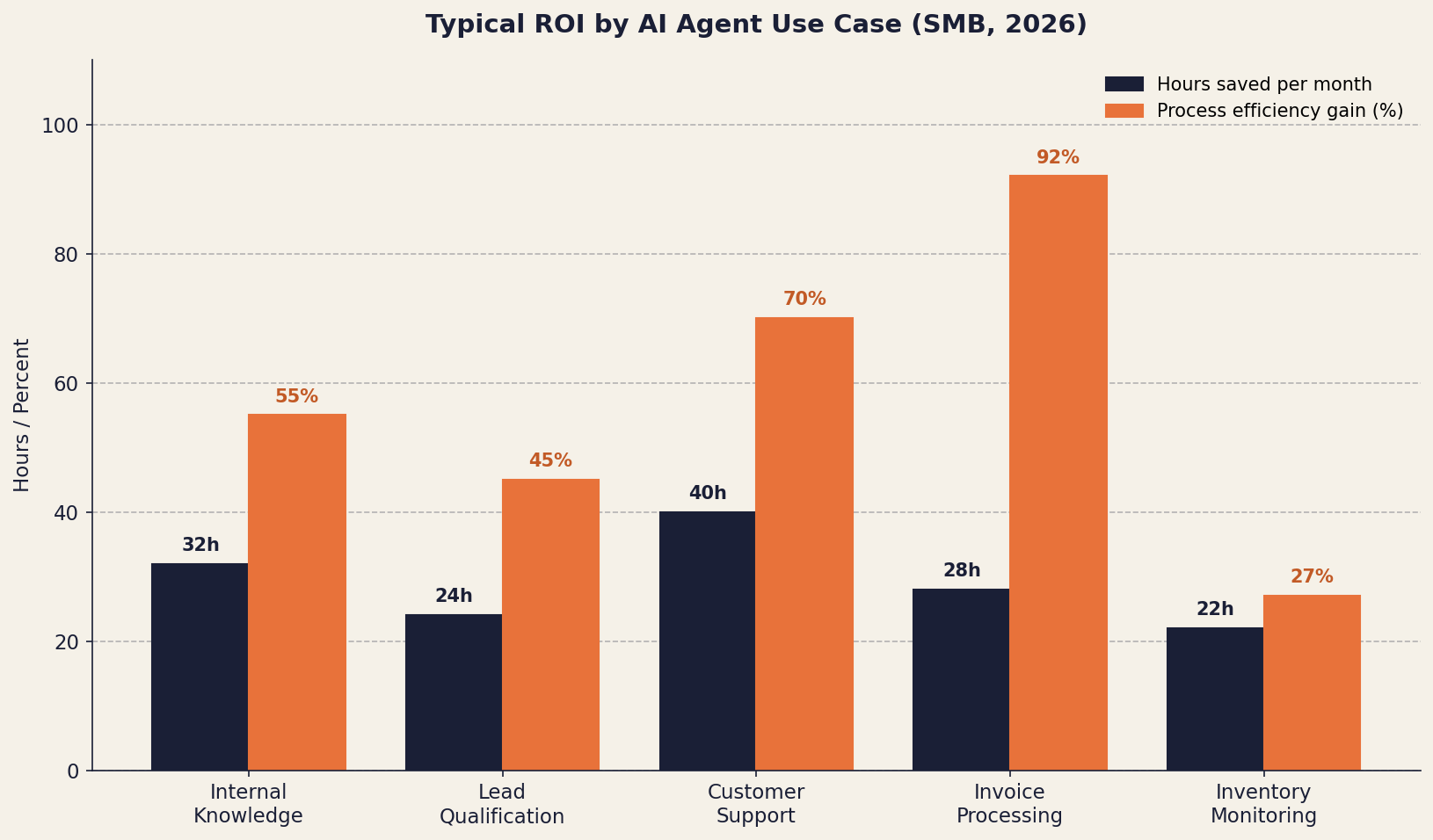
The chart above is a useful sanity check: the highest absolute hours-saved comes from customer support (where ticket volume is high), but the highest process efficiency gain comes from invoice processing (where each task is small but the cycle time compresses dramatically). Inventory monitoring shows a smaller percentage gain because the human work it replaces is spiky rather than constant — a few hours of manual reconciliation a week, with the bigger ROI hiding in avoided stockouts and tied-up working capital that don't show up on a per-task chart.
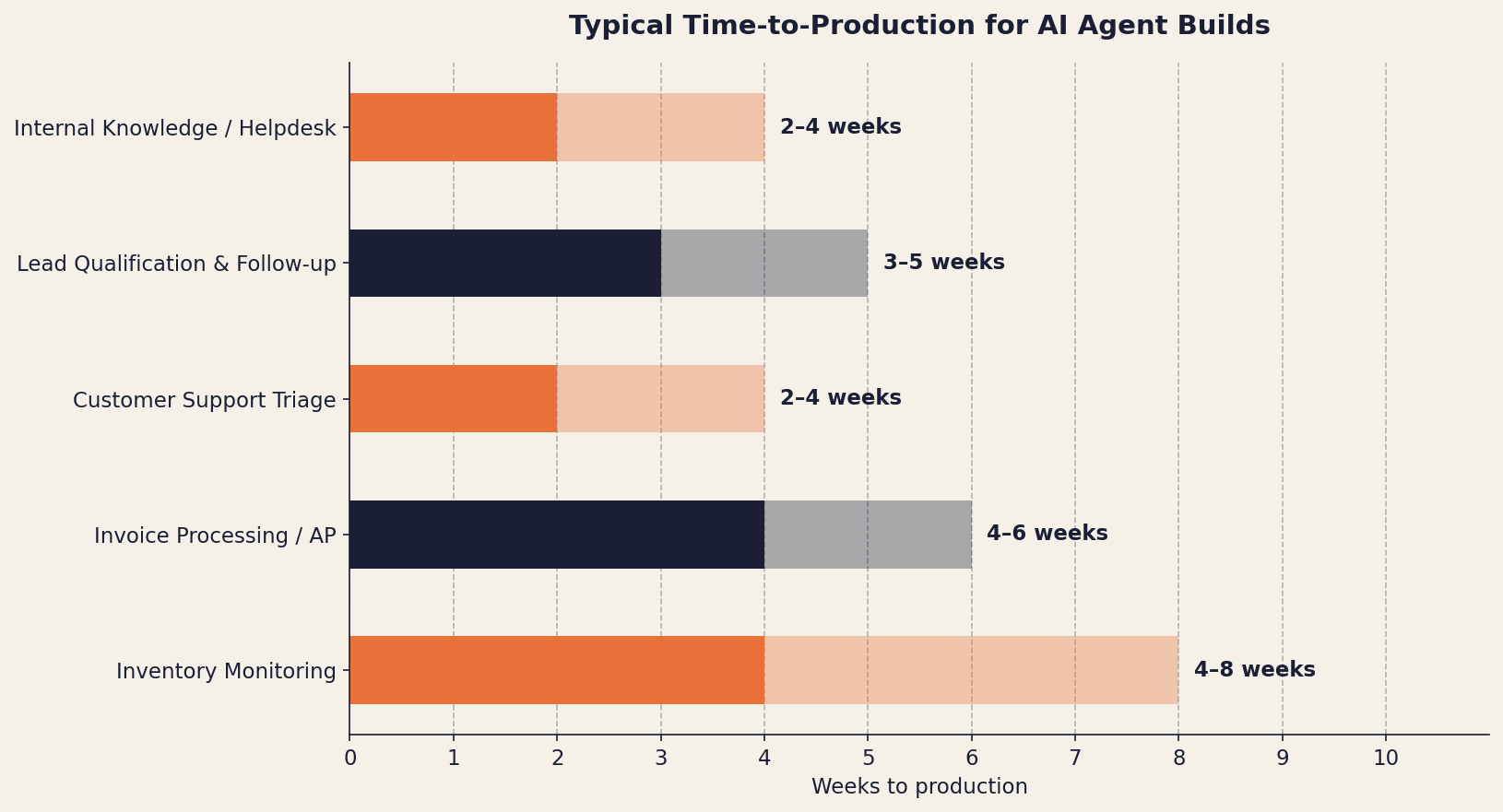
Time-to-production is the second variable to weigh. Internal helpdesk and customer support both ship fastest because they don't require touching financial systems or the operations of record. Inventory has the longest tail because data-quality cleanup is almost always a prerequisite project rolled into the build.
Build vs Buy: When to Use Off-the-Shelf vs Custom
Three of the five use cases above have credible off-the-shelf options as of 2026:
- Customer support: Intercom Fin, Zendesk AI, Forethought, Ada
- Lead qualification: Clay, Apollo, HubSpot Breeze, Outreach AI
- Internal knowledge: Glean, Sana AI, Notion AI, Lindy
Two of them — invoice processing and inventory monitoring — typically need a custom build because they require deep integration with whatever combination of POS / ERP / accounting / vendor systems your business already uses. There is no SaaS product that can match-and-route invoices against your specific PO format, your specific approval rules, and your specific accounting tags out of the box.
A useful decision rule:
- Use off-the-shelf if the workflow is generic to your industry, the integrations needed are with mainstream SaaS tools, and you don't have an unusual data model.
- Build custom if the workflow is specific to your operations, you have proprietary data the agent needs to reason over, or you're tying together a stack of internal systems no SaaS vendor would think to integrate.
For the build path, the underlying tooling has matured fast: orchestration with n8n or Temporal, agent frameworks like LangGraph or the OpenAI Agents SDK, and direct API access to Claude or GPT-4 for the reasoning layer. A capable small team can ship a production agent for any of the five use cases above in 4–8 weeks. We covered the broader build vs buy lens in How AI Agents Are Transforming Business Operations.
Frequently Asked Questions
What's the easiest business process to automate with AI agents first?
The easiest first project is an internal knowledge / employee helpdesk agent. It deflects repetitive HR and IT questions with low downside risk — wrong answers stay inside the company, and you build the operational patterns (feedback loops, escalations, integration plumbing) you'll need for higher-stakes external use cases. Most SMBs ship this in 2–4 weeks and see payback within a quarter.
How much does it cost to build an AI agent for business automation?
A focused single-process AI agent for an SMB costs $8,000 to $25,000 USD (₱450K to ₱1.4M PHP) to build with a Philippine studio, plus $200–$2,000/month in LLM inference depending on volume. Off-the-shelf tools run $50–$500/seat/month per use case. The build-vs-buy break-even is usually around 12–18 months — custom wins for niche workflows; off-the-shelf wins for generic ones.
How long does it take to deploy an AI agent in a real business workflow?
Most production AI agents go live in 2–8 weeks depending on integration complexity. Internal helpdesk and lead qualification land at the short end (2–4 weeks); invoice processing and inventory monitoring are at the longer end (4–8 weeks) because they require deeper system integration and stricter accuracy requirements before you can trust the agent unsupervised.
Can AI agents fully replace human employees?
No, and businesses that try to position them that way get worse results than businesses that don't. AI agents handle the 80% of work that is repetitive and rules-rich, freeing humans for the 20% that requires judgment, empathy, escalation handling, or creative problem-solving. The most successful deployments redesign roles around this split rather than trying to eliminate them.
What's the risk of automating customer-facing processes with AI agents?
The main risk is confident wrong answers — agents that respond accurately 95% of the time will still tank CSAT if the 5% of wrong answers go out unsupervised. Mitigate this by setting a confidence threshold (above which the agent sends, below which a human reviews), starting on lower-stakes channels first, and tracking false positives weekly. Customer-facing automation should always have a clean path to human escalation.
Is AI agent automation suitable for small businesses in the Philippines?
Yes — arguably more so than for enterprises. Philippine SMBs are operations-heavy, often have manual back-office workflows, and have a labor cost structure where saving 30–60 hours of staff time per month meaningfully shifts margins. The infrastructure layer (Claude, GPT-4, n8n, Supabase) is the same as in any market; what makes Philippine deployments distinct is the integration with local-context tools — Viber, Messenger, PayMongo, BIR-compliant accounting flows.
How do I measure ROI on an AI agent deployment?
Track three things from week one: time saved (hours per week reclaimed by automation), error rate (false positives in agent responses), and output quality (deflection rate, customer satisfaction, conversion rate — depending on the use case). Add direct cost savings (e.g., reduced AP processing cost, recovered early-payment discounts) for finance-related agents. Most well-scoped agents pay back their build cost in 2–6 months.
Final Thoughts
The single most important decision when deploying AI agents in your business is picking the right first project. The five processes above are not the only ones that work — they are the ones with the highest ratio of measurable ROI to implementation risk in 2026. They have mature tooling, well-understood failure modes, and a clear path from proof-of-concept to production.
The mistake we see most often is the opposite of moving slowly: businesses trying to automate three or four processes simultaneously with one rushed build, instead of shipping one well and learning from it. AI agents reward focus. One automated workflow that runs reliably and saves 8 hours a week beats three half-built ones that need constant babysitting.
If you want to figure out which of the five would deliver the highest ROI for your specific business, book a free consultation call — we'll walk through your current operations, identify the highest-leverage starting point, and scope what a real first deployment would look like.
Written by
Jabez Borja
More articles
How to Evaluate If Your Business Is Ready for AI Automation
A practical AI readiness assessment for business owners — the five dimensions that decide whether automation will pay off, a self-scoring scorecard, a step-by-step assessment process, and the green lights and red flags to check before you build.
Hidden Costs of Software Development Nobody Warns You About
The line items that don't show up in a software quote but blow up the budget anyway — maintenance, infrastructure, scope creep, integrations, and more. A 2026 breakdown with realistic ranges and a pre-signature checklist.
Our Tech Stack for Building Client Projects in 2026: Tools, Infra, and Why
A transparent look at the tech stack StackSpace uses to build client projects in 2026 — the frontend, backend, database, infrastructure, and AI tools we default to, the criteria we choose them on, and where we deliberately deviate.
Want to build something?
We help businesses turn ideas into production software. Book a discovery call and let's talk about your project.