
Supabase vs Firebase vs Custom Backend: A Practical Decision Guide
A 2026 comparison of Supabase, Firebase, and a custom backend — database model, realtime, pricing at scale, vendor lock-in, and how to actually choose.
Supabase vs Firebase vs Custom Backend: Which Should You Choose?
Choose Supabase when your data is relational and you want SQL, open-source portability, and AI-ready features. Choose Firebase when you're mobile-first and need best-in-class realtime sync and offline support. Build a custom backend when you have complex domain logic, strict compliance needs, or scale economics that justify owning the whole stack. Most products fit one of these cleanly.
That's the short answer most teams need. The longer version is more honest: the "right" backend depends less on which tool is technically best and more on the shape of your product, your team, and where you'll be in two years. This is the comparison we'd give a founder who asked us privately — including where we'd tell them not to reach for the obvious choice.
What Each Option Actually Is in 2026
Before comparing them, it's worth defining each precisely — because the three options aren't even the same kind of thing. Two are managed backend-as-a-service (BaaS) platforms; the third is a category of approaches you assemble yourself.
Supabase
Supabase is an open-source backend-as-a-service built on PostgreSQL. You get a full Postgres database (with real SQL, joins, transactions, and extensions), plus built-in Authentication, file Storage, Realtime subscriptions, Edge Functions (TypeScript on Deno), and auto-generated REST and GraphQL APIs. Authorization is handled at the database layer through Postgres Row Level Security (RLS). Because it's standard Postgres under the hood and the whole platform is open source, you can self-host it or move your data to any Postgres provider.
Firebase
Firebase is Google's proprietary backend-as-a-service, tightly integrated with Google Cloud. Its core is Firestore, a NoSQL document database with real-time listeners and excellent offline support. Around that sit Authentication, Cloud Functions, Cloud Storage, Hosting, push notifications (FCM), Crashlytics, Analytics, and Gemini-backed AI features through Vertex AI. Firebase's mobile SDKs for iOS, Android, and Flutter are the most mature in the market — it was built mobile-first and still shows it.
A Custom Backend
A custom backend is an API server and database you build and host yourself. In 2026 that usually means a framework like NestJS, Django, FastAPI, or Go on the API layer, a database like Postgres or MySQL, and infrastructure on AWS, GCP, Railway, Render, or Fly.io. You own every layer — schema, business logic, auth, scaling, and deployment — which means total control and zero platform lock-in, at the cost of building and maintaining what a BaaS gives you out of the box.
Supabase vs Firebase vs Custom Backend: The Full Comparison
For a typical startup or SME product — a web app, a mobile app, or an internal operations platform — here's how the three options compare across the dimensions that actually drive the decision.
| Dimension | Supabase | Firebase | Custom Backend |
|---|---|---|---|
| Database model | PostgreSQL (relational, SQL) | Firestore (NoSQL, document) | Your choice |
| Auth & authorization | Built-in, Row Level Security | Built-in, security rules | Build or integrate |
| Realtime | Yes (Postgres changes, broadcast, presence) | Best-in-class, native | Build it (WebSockets) |
| Offline / mobile sync | Improving, not native | Excellent, first-class | Build it |
| Pricing model | Predictable (compute + tier) | Usage-based (reads/writes) | Infra + engineering time |
| Vendor lock-in | Low — open source, standard Postgres | High — proprietary | None |
| Time to first build | Days | Days | Weeks |
| Scaling | Postgres scales well; tune at extreme scale | Auto-scales massively | Your responsibility |
| AI / vector search | Native (pgvector) | Via extensions / Vertex AI | Your choice |
| Best fit | Relational data, web SaaS, AI features | Mobile-first, realtime, prototypes | Complex logic, compliance, control |
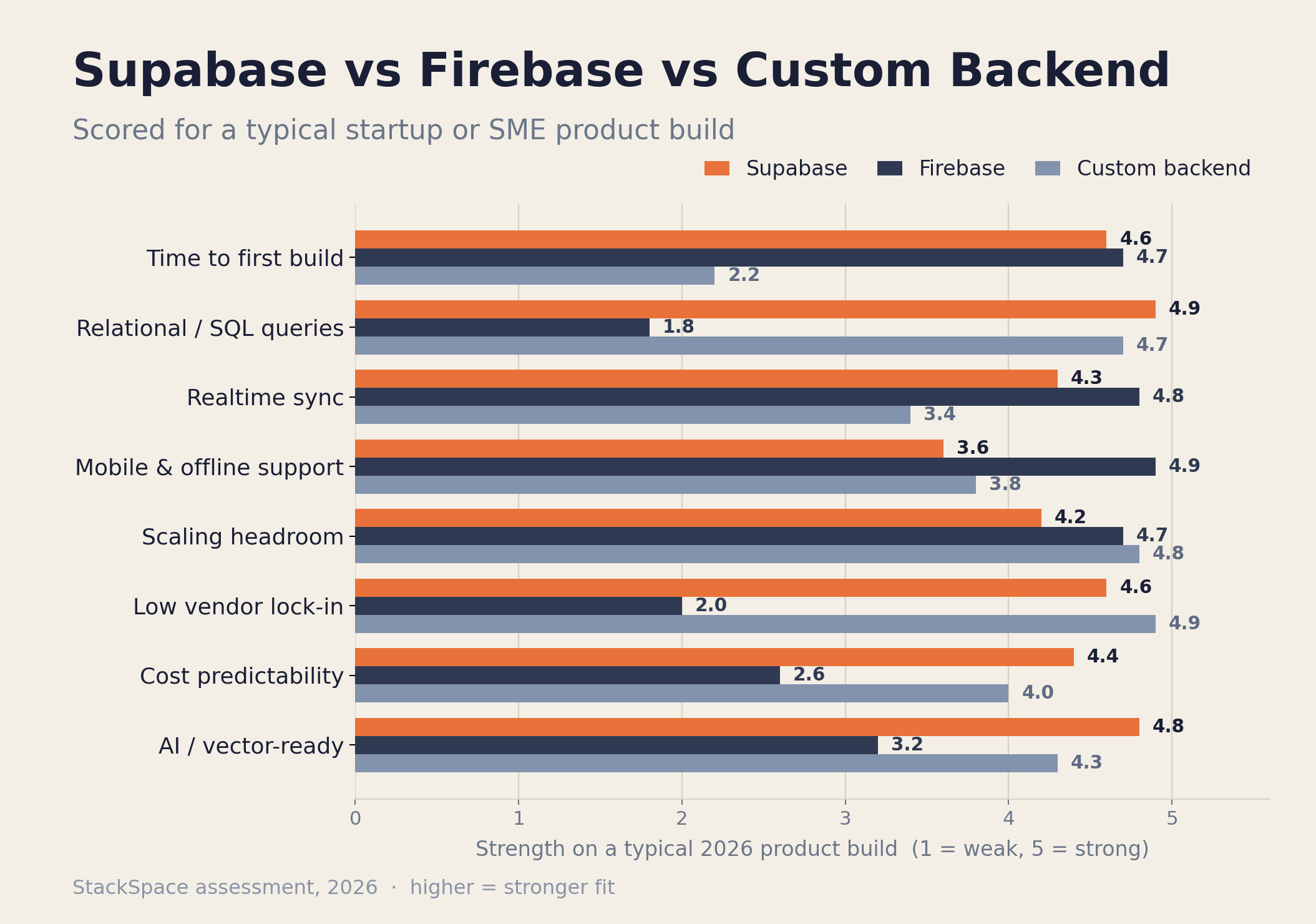
The row most teams underweight is vendor lock-in. It costs nothing on day one and everything on the day you outgrow your platform. Firestore's data model and query semantics don't map cleanly onto anything else, so migrating off Firebase is a rewrite, not an export. Supabase, being standard Postgres, can move to any Postgres host. A custom backend has no platform to leave. None of this makes Firebase wrong — it makes the lock-in a price you should choose deliberately, not back into.
The Database Model Is the Real Decision
The single most consequential difference between these options is the database model: Supabase gives you a relational SQL database, Firebase gives you a NoSQL document store, and a custom backend lets you pick either. Almost everything else follows from this one choice.
A relational model (Supabase/Postgres) shines when your data has clear relationships — users, orders, line items, organizations, permissions — and you need to query across them. SQL joins, transactions, and constraints keep your data consistent and your queries expressive. If you can imagine writing "show me every customer who placed more than three orders last month," Postgres answers that in one query.
A document model (Firebase/Firestore) shines when your data is hierarchical and read-heavy, and your access patterns are known in advance. It denormalizes beautifully for fast reads at scale and syncs to mobile devices effortlessly. The trade-off is that ad-hoc queries, joins, and aggregations are awkward or impossible — you model your data around the screens you'll show, and changing those screens later can mean re-modeling your data.
A useful rule we use with clients: if your product is fundamentally about relationships between things, lean relational; if it's about streaming documents to devices, lean document. Most B2B SaaS, dashboards, marketplaces, and ERP-style platforms are relational. Most chat apps, social feeds, and collaborative mobile tools lean document. We unpack the same "match the tool to the workload" logic for ERP platforms in Off-the-Shelf ERP vs Custom-Built.
What Each Backend Costs as You Scale
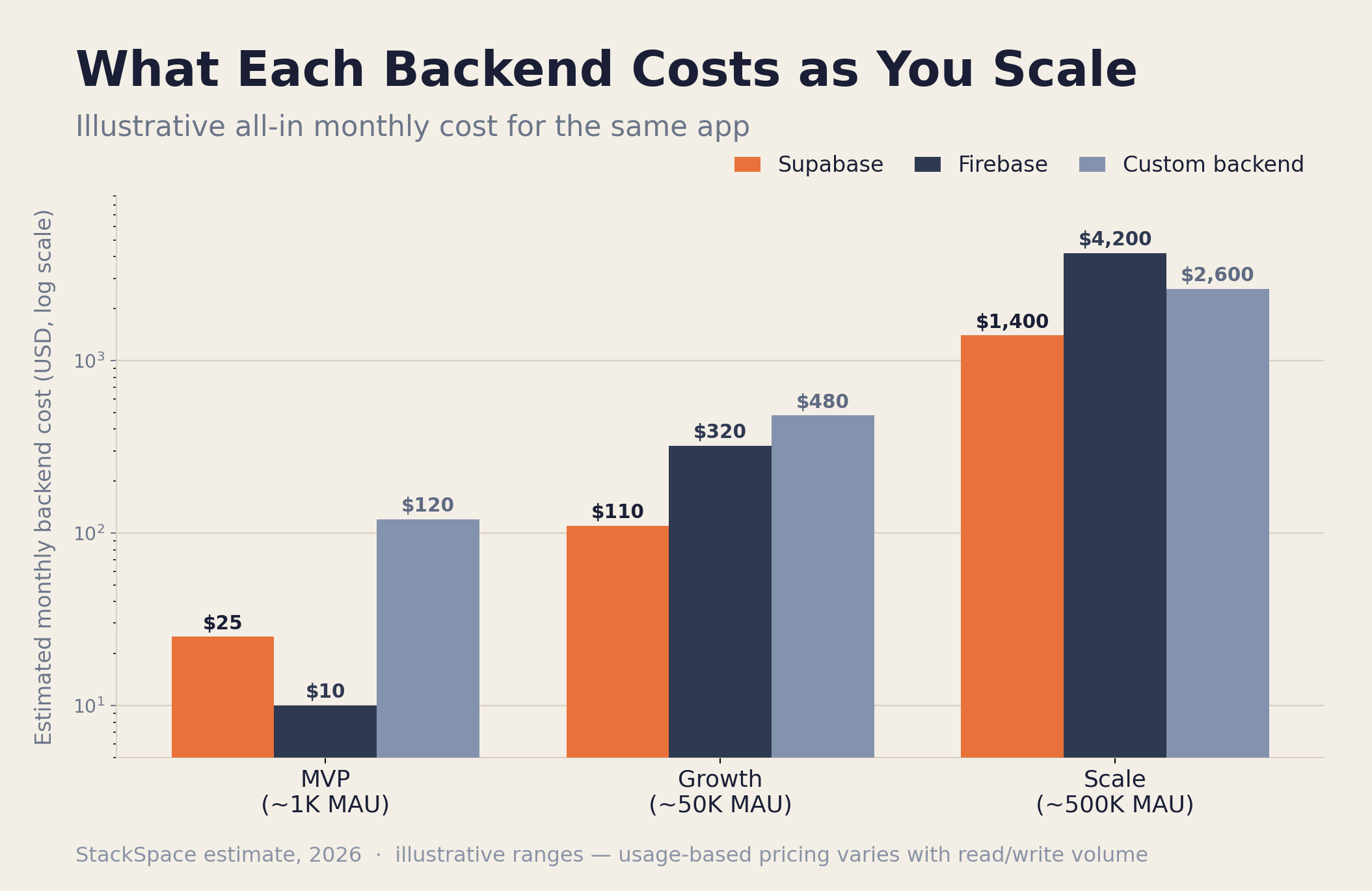
Early on, all three are cheap — Supabase and Firebase both have generous free tiers, and a small custom backend runs on a $50–$200/month box. The costs diverge sharply at scale, and they diverge in different directions: Supabase and a custom backend stay relatively predictable, while Firebase's per-operation pricing can spike with traffic.
| Scale | Supabase | Firebase | Custom Backend |
|---|---|---|---|
| MVP (~1K MAU) | $0 – $25/mo | $0 – $25/mo | $50 – $200/mo |
| Growth (~50K MAU) | $25 – $150/mo | $100 – $500/mo | $300 – $800/mo |
| Scale (~500K+ MAU) | $599 – $2,500/mo | $2,000 – $10,000+/mo | $2,000 – $8,000/mo |
These ranges are illustrative — real numbers depend heavily on read/write volume, storage, and bandwidth. But the shape is reliable. Supabase Pro starts at a flat $25/month and scales with compute, so you can forecast it. Firebase's Blaze plan bills per document read, write, and delete, which means a chatty app or a poorly indexed query can multiply your bill without warning — the classic "we got featured and our Firebase invoice 10x'd overnight" story. A custom backend has the highest floor (you're paying for infrastructure and the engineers to run it) but the most optimizable ceiling: at very high volume, owning your stack is often cheaper per user than any BaaS.
The hidden cost a pricing page never shows is engineering time. A BaaS trades dollars for speed — you ship in days instead of weeks. A custom backend trades speed for control. For most teams under a few hundred thousand users, the BaaS math wins; we walk through the full lifecycle picture in The True Cost of Building a Custom Web Application.
When Each Option Wins
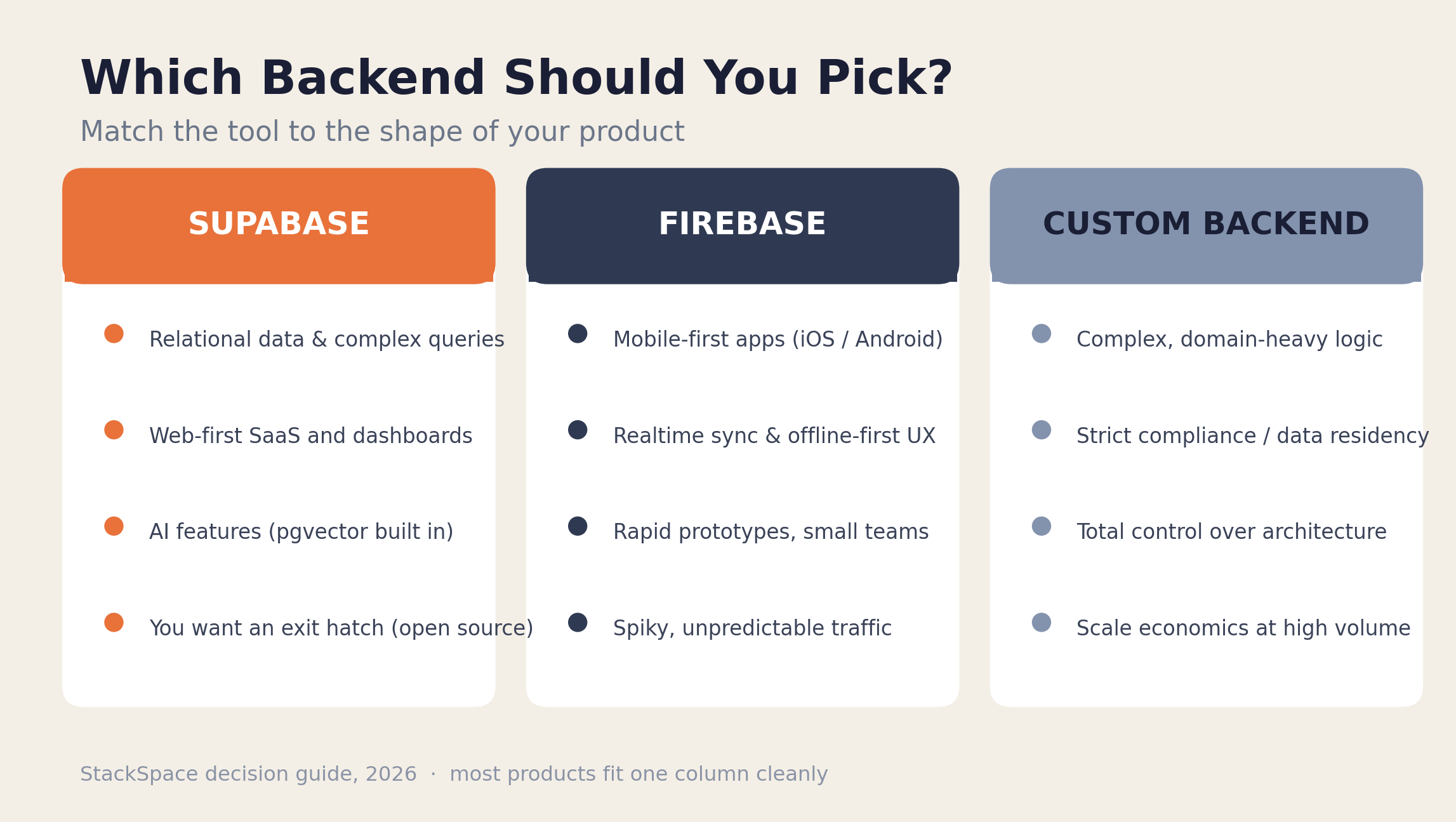
The decision usually comes down to the shape of your product. Here's where each option is clearly the right call — and where reaching for it is a mistake.
When Supabase wins
Supabase is the default we reach for on most web-first product builds. It's the strongest choice when your data is relational, when you want SQL and the ability to write real queries, when you're building AI features (pgvector makes embeddings and semantic search a first-class citizen), and when portability matters — open source and standard Postgres mean you're never trapped. It's also a fast path to an MVP without sacrificing a real database underneath.
Don't choose Supabase if you need bulletproof offline-first mobile sync today — that's still Firebase's home turf.
When Firebase wins
Firebase is the right call for mobile-first apps where offline support and realtime sync are core to the experience — think collaborative tools, chat, live dashboards, and consumer apps. Its SDKs and Google Cloud integration let a small team ship a polished cross-platform app remarkably fast, and Firestore auto-scales to massive read volume without you thinking about it.
Don't choose Firebase if your data is deeply relational, if you need complex queries and reporting, or if predictable billing matters more than raw convenience — the NoSQL model and usage-based pricing will fight you.
When a custom backend wins
A custom backend wins when the backend itself is the hard part: complex domain logic, heavy background processing, intricate permissions, or integrations a BaaS can't model. It's also the right choice under strict compliance or data-residency requirements, when you need total architectural control, or at a scale where owning the stack is cheaper than paying platform margins. We see this most in fintech, healthcare, logistics, and large operations platforms.
Don't build a custom backend to validate an idea. For an MVP, it's almost always over-engineering — a point we make in our MVP development cost breakdown.
How to Choose Your Backend: A 5-Step Framework
When a founder asks us which backend to use, we don't start with the tools — we start with the product. Here's the exact sequence we walk through.
Step 1: Model your core data
Sketch your main entities and how they relate. If the relationships are central and you'll need to query across them, you're relational (Supabase or custom Postgres). If your data is a tree of documents you'll mostly read by key, you're document-friendly (Firebase).
Step 2: Decide how much realtime and offline you truly need
Be honest about whether "realtime" is a core feature or a nice-to-have. If offline-first mobile sync is non-negotiable, that pulls hard toward Firebase. If realtime is occasional notifications and live updates, Supabase covers it comfortably.
Step 3: Audit your team and timeline
A two-person team shipping in six weeks should use a BaaS — full stop. Building a custom backend with a small team and a tight deadline is how MVPs miss their window. Reserve custom for teams with backend depth and a real reason to own the stack. (For the broader stack picture, see Next.js vs React Native vs Flutter.)
Step 4: Weigh lock-in against speed
Ask: "What happens in two years if we outgrow this?" If a future migration would be catastrophic, weight portability heavily — that favors Supabase or a custom backend. If you'd happily rewrite once you've found product-market fit, Firebase's speed is worth the lock-in.
Step 5: Forecast cost at your real scale
Estimate your traffic at 12 and 24 months, then model the cost. If you expect high, spiky read volume, Firebase's per-operation billing is a risk. If you want a number you can budget around, Supabase's tiers or a custom backend's fixed infrastructure are easier to plan.
Real-World Scenarios: What We'd Actually Recommend
Frameworks are useful, but specifics are clearer. Here's what we'd recommend for five common situations.
B2B SaaS with dashboards and reporting → Supabase. Relational data, complex queries, role-based access via RLS, and predictable pricing. This is Supabase's sweet spot.
Consumer mobile app with chat and offline use → Firebase. Offline-first sync, realtime, and mature mobile SDKs make this an easy call. Accept the lock-in as the price of speed.
AI-powered product (search, RAG, recommendations) → Supabase. pgvector means your embeddings live next to your relational data, and you can query both with SQL. No extra vector database to operate.
Fintech or healthcare platform with compliance needs → Custom backend. Data residency, audit trails, and bespoke security usually outgrow what a BaaS will commit to. Own the stack.
Early-stage MVP to test demand → Supabase or Firebase, never custom. Pick based on relational-vs-document, ship in weeks, and revisit the decision once you have users. The worst MVP backend is the one you spent three months building before anyone signed up.
Common Mistakes Teams Make
A few patterns show up again and again when teams pick a backend — usually the expensive kind to undo.
- Choosing NoSQL for relational data. Picking Firestore because it's fast to start, then bolting awkward joins and aggregations onto it for the next two years. Model your data first, then pick the database.
- Building custom too early. Spending the entire runway building backend plumbing a BaaS gives you free, instead of finding out whether anyone wants the product.
- Ignoring the pricing model until the bill arrives. Per-operation billing is fine until it isn't. Model your read/write volume before you commit, not after you get featured.
- Underrating lock-in. "We'll deal with migration later" is a real decision with a real cost. Make it on purpose.
- Treating the choice as permanent. It isn't. Plenty of products start on a BaaS and graduate parts of their workload to a custom service as they scale. Pick the right tool for now, and design so the future migration is a project, not a catastrophe.
Frequently Asked Questions
Is Supabase better than Firebase in 2026?
Neither is universally better — they suit different products. Supabase wins for relational data, SQL, AI features, and avoiding lock-in, which covers most web-first SaaS. Firebase wins for mobile-first apps that need best-in-class realtime sync and offline support. Pick based on your data model and platform, not on which is "newer."
Is Supabase a true Firebase alternative?
For most web and relational use cases, yes. Supabase offers the same core BaaS pieces — database, auth, storage, realtime, and serverless functions — on open-source PostgreSQL instead of a proprietary NoSQL store. Where it isn't a drop-in replacement is mature offline-first mobile sync, which remains Firebase's strongest advantage in 2026.
When should I build a custom backend instead of using a BaaS?
Build custom when the backend is the hard part: complex domain logic, strict compliance or data-residency rules, heavy background processing, or a scale where platform margins exceed the cost of owning your stack. For MVPs and most standard apps, a BaaS like Supabase or Firebase ships faster and cheaper — building custom too early is the more common mistake.
Why can Firebase get expensive at scale?
Firebase's Blaze plan bills per document read, write, and delete. Apps with chatty clients, real-time listeners, or unindexed queries can generate far more operations than expected, so bills can spike suddenly with traffic. Supabase's compute-based tiers and a custom backend's fixed infrastructure are easier to forecast at scale.
Can I use Supabase for a mobile app?
Yes — Supabase has client libraries for Flutter, React Native, Swift, and Kotlin, and handles auth, storage, and realtime well on mobile. The gap versus Firebase is offline-first sync: Firebase's local persistence and conflict handling are more mature. If your mobile app must work seamlessly offline, weigh that carefully.
Does Supabase support AI and vector search?
Yes, natively. Supabase includes the pgvector Postgres extension, so you can store embeddings alongside your relational data and run semantic search with SQL. That makes it a strong fit for retrieval-augmented generation (RAG) and AI features without operating a separate vector database — a real advantage over Firebase for AI-heavy products.
Which backend is cheapest for a startup?
At MVP scale, Supabase and Firebase are both effectively free and cheaper than a custom backend, which carries infrastructure and DevOps cost from day one. The real cost is engineering time: a BaaS lets a small team ship in weeks. Reserve a custom backend for when control or scale economics genuinely justify owning the stack.
Key Takeaways
- The database model is the real decision. Relational data → Supabase (or custom Postgres). Document, mobile-synced data → Firebase. Almost everything else follows from this.
- Supabase is the web-first default. SQL, open source, predictable pricing, and native AI/vector support make it the safe choice for most SaaS and dashboards.
- Firebase owns mobile realtime. Best-in-class offline sync and mature SDKs make it the right call for mobile-first and collaborative apps — if you accept the lock-in and usage-based billing.
- Custom backends are for when the backend is the hard part. Complex logic, compliance, or scale economics — not for MVPs.
- Lock-in and pricing model are the underrated factors. Decide them on purpose, before they decide for you.
- The choice isn't permanent. Pick the right tool for now and design so a future migration is a project, not a rewrite.
If you're weighing these options for a specific product and want a second opinion on which backend actually fits, book a free consultation call. We'll look at your data model, your timeline, and where you want to be in two years — and tell you honestly which way we'd build it.
Further reading: Next.js vs React Native vs Flutter: How to Choose Your Stack in 2026, MVP Development Cost Breakdown, and How We Scope a Custom Software Project in 48 Hours.
Written by
Jabez Borja
More articles
How to Evaluate If Your Business Is Ready for AI Automation
A practical AI readiness assessment for business owners — the five dimensions that decide whether automation will pay off, a self-scoring scorecard, a step-by-step assessment process, and the green lights and red flags to check before you build.
Hidden Costs of Software Development Nobody Warns You About
The line items that don't show up in a software quote but blow up the budget anyway — maintenance, infrastructure, scope creep, integrations, and more. A 2026 breakdown with realistic ranges and a pre-signature checklist.
Our Tech Stack for Building Client Projects in 2026: Tools, Infra, and Why
A transparent look at the tech stack StackSpace uses to build client projects in 2026 — the frontend, backend, database, infrastructure, and AI tools we default to, the criteria we choose them on, and where we deliberately deviate.
Want to build something?
We help businesses turn ideas into production software. Book a discovery call and let's talk about your project.